Linux umask Command: Default Permissions Explained
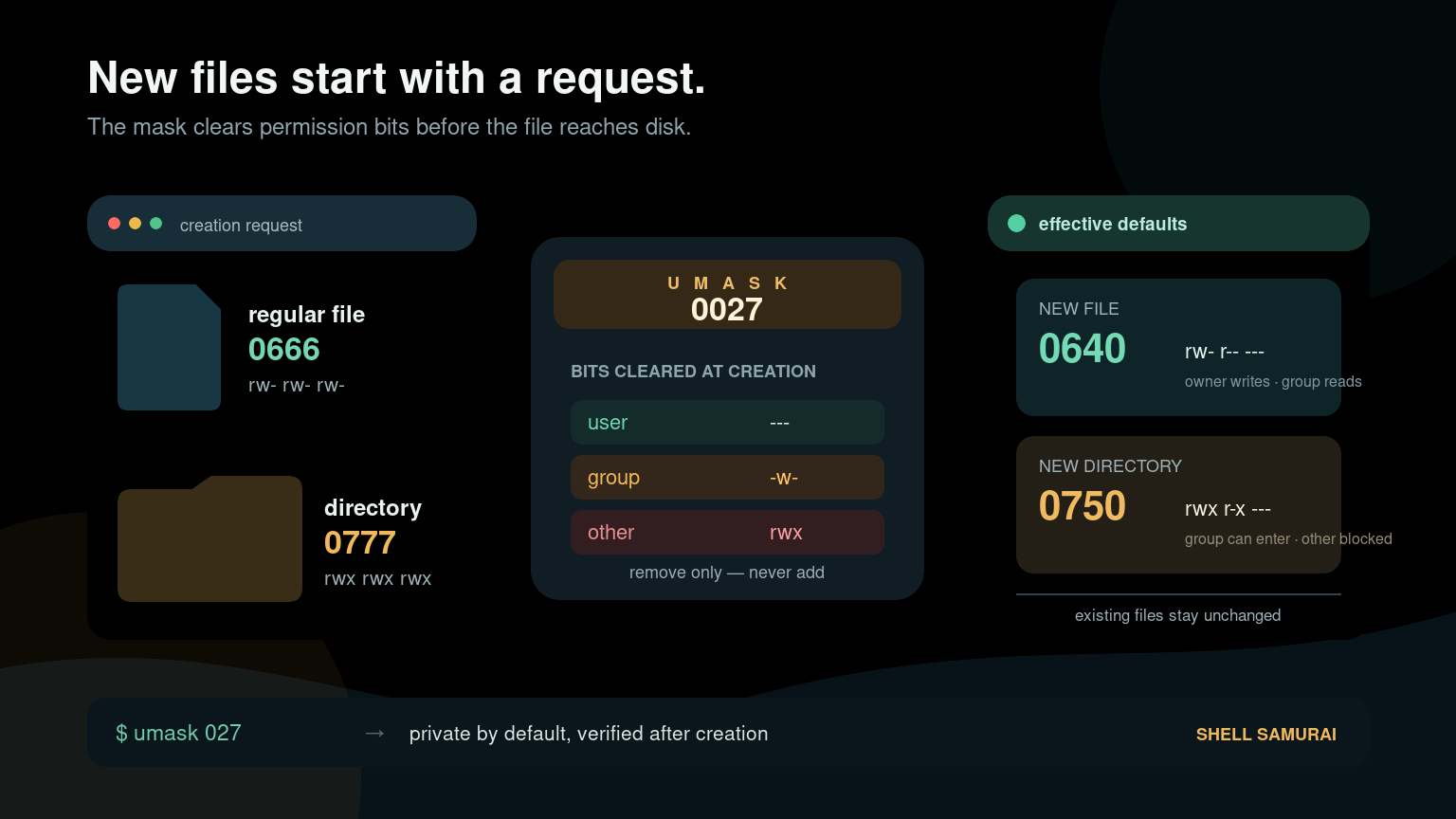
The Linux umask command controls which permission bits are removed by default when a process creates a file or directory. It does not change existing files.
Run these two commands first:
umask
umask -S
A common result is 0022. That normally gives new files permission mode 644 and new directories mode 755. A stricter 0027 normally produces files with 640 and directories with 750.
Use umask when new files are unexpectedly private, shared files are not writable by a team, or a service creates data that too many users can read.
Quick umask reference
| Goal | Command or result |
|---|---|
| Show the current numeric mask | umask |
| Show the mask in symbolic form | umask -S |
| Set a common personal default | umask 022 |
| Allow owner and group collaboration | umask 002 |
| Keep access to owner and group only | umask 027 |
| Keep new content private to the owner | umask 077 |
022 result for new files | 644 |
022 result for new directories | 755 |
027 result for new files | 640 |
027 result for new directories | 750 |
077 result for new files | 600 |
077 result for new directories | 700 |
Changing umask in a shell affects that shell and programs started from it. It does not rewrite old permissions and usually does not create a permanent system-wide setting.
What umask actually does
Linux permission modes have three classes:
- User (
u) — the file owner - Group (
g) — members of the file’s group - Other (
o) — everyone else
Each class can receive:
- Read (
r) =4 - Write (
w) =2 - Execute (
x) =1
Programs normally request a starting mode when creating content. For typical command-line tools, that starting point is:
- Files:
666(rw-rw-rw-) - Directories:
777(rwxrwxrwx)
The kernel applies the process’s umask by clearing masked bits. With a mask of 022, group and other lose write permission:
Requested file mode:       666  rw-rw-rw-
Mask removes:              022  ----w--w-
Typical final file mode:   644  rw-r--r--

Requested directory mode:  777  rwxrwxrwx
Mask removes:              022  ----w--w-
Typical final dir mode:    755  rwxr-xr-x
People often describe this as subtraction because the common examples look like 666 - 022 = 644. The accurate model is bit removal, not ordinary decimal subtraction. That distinction matters with unusual combinations.
Why new files are not executable by default
A frequent beginner question is: if directories begin from 777, why do files begin from 666?
Directories need execute permission to be entered and traversed. Ordinary files should not become executable merely because an editor, downloader, or script created them. The creating program usually requests 666, which contains no execute bits. A umask cannot add execute permission; it only removes permissions from the mode requested by the program.
If you create a script, make it executable deliberately after reviewing it:
chmod u+x backup-report.shThe Linux file permissions guide explains rwx, chmod, and modes such as 644 and 755 in more detail.
Read your current umask
Run:
umaskDepending on the shell, the output may contain three or four digits:
0022The leading zero identifies octal notation and is commonly displayed even though people often say “umask zero-two-two” or simply “mask twenty-two.” The last three digits map to user, group, and other.
For a more readable view:
umask -SExample:
u=rwx,g=rx,o=rxThis symbolic output describes the permissions that remain allowed by the mask. Numeric output describes the bits being removed. That reversed perspective is why umask feels backward at first.
Understand common umask values
umask 022: readable by everyone, writable by owner
umask 022Typical results:
- New files:
644(rw-r--r--) - New directories:
755(rwxr-xr-x)
This is common for user accounts and content meant to be readable but not editable by other users.
umask 002: group collaboration
umask 002Typical results:
- New files:
664(rw-rw-r--) - New directories:
775(rwxrwxr-x)
This can work for a team using shared group ownership. It is not enough by itself: the directory’s group, setgid behavior, ACLs, and application behavior must also be correct.
umask 027: owner and group access only
umask 027Typical results:
- New files:
640(rw-r-----) - New directories:
750(rwxr-x---)
This is a useful service or administrative default when the owner needs full access, the group needs read or traversal access, and everyone else should have none.
umask 077: owner only
umask 077Typical results:
- New files:
600(rw-------) - New directories:
700(rwx------)
Use this for private exports, credential material, or temporary work that should not be exposed to other local users. Applications can still request stricter modes.
Test a umask safely
Use a temporary lab directory rather than experimenting inside an application path:
mkdir -p ~/umask-lab
cd ~/umask-lab
umask 027
touch test-file
mkdir test-directory
ls -ld test-file test-directory
Expected output resembles:
drwxr-x--- 2 sam sam 4096 Jul 21 09:15 test-directory
-rw-r----- 1 sam sam    0 Jul 21 09:15 test-file
You can also ask stat for the numeric and symbolic modes:
stat -c '%a %A %n' test-file test-directoryExample:
640 -rw-r----- test-file
750 drwxr-x--- test-directory
The Linux stat command guide covers this inspection pattern and explains timestamps, ownership, and mode output.
Open a new terminal after the test if you do not want the changed mask to affect more commands. You can also record the old value before testing and restore it afterward:
old_umask=$(umask)
umask 027
# Create test content here.
umask "$old_umask"
A realistic shared-folder ticket
A helpdesk ticket says: “Everyone can read files in /srv/reports, but coworkers cannot update files created by the reporting account.”
Start by checking the directory and a recent file:
ls -ld /srv/reports
ls -l /srv/reports/recent-report.csv
stat -c '%a %U %G %n' /srv/reports /srv/reports/recent-report.csv
Then inspect the mask in the same context that creates the file. Checking your own interactive shell may be irrelevant if a systemd service, cron job, container, or application creates the report.
For an interactive reproduction:
umask
umask -S
touch /srv/reports/umask-test-file
stat -c '%a %U %G %n' /srv/reports/umask-test-file
If the account uses umask 022, the file will commonly be 644; the group cannot write it. A collaborative setup may use 002, but first verify all of these:
- The approved access policy actually allows group writes.
- The creator belongs to the intended group.
- The parent directory has the correct group ownership.
- The directory uses the setgid bit if new content should inherit its group.
- No ACL, service sandbox, container mapping, or network filesystem policy changes the result.
- The application does not explicitly request a stricter mode.
Do not fix the ticket by recursively granting broad permissions. That can expose old reports, alter application expectations, and create a much more interesting ticket for the security team.
Set umask temporarily
In Bash and many other shells, umask is a shell builtin:
type umaskSet it for the current shell:
umask 027Every child process started from that shell inherits the mask unless it changes the value itself. Another already-running terminal does not change.
To apply a mask to one command without changing your interactive shell, start a child shell:
bash -c 'umask 077; touch private-export.txt'Then verify:
stat -c '%a %n' private-export.txtMake a user umask persistent
The correct startup file depends on the shell, distribution, and whether the session is login, interactive, graphical, or remote. Common Bash locations include:
~/.profile~/.bash_profile~/.bashrc- System-managed login configuration
A simple user setting looks like:
umask 027Do not paste it into every startup file. First identify which file the session actually reads. Duplicate settings create the classic “I changed it, but something changed it again” problem.
After editing the right file, start a fresh session and verify both the mask and a newly created test file. Existing files will not change.
Set umask for a systemd service
A service should define its own policy instead of relying on an administrator’s interactive shell. In a systemd unit or drop-in, use:
[Service]
UMask=0027
Create a drop-in with the approved service-management process, reload the unit definitions, and restart the service during an appropriate change window. Then verify a newly created file.
Useful checks include:
systemctl cat report-generator.service
systemctl show report-generator.service -p UMask
Be careful with restarts on production systems. The systemctl beginner guide covers status checks, restarts, enablement, and service logs.
Why the result may not match the umask
A umask sets the maximum default permissions, but it is not the only control involved.
The application requests a stricter mode
An SSH client, database, credential tool, or security-sensitive application may create a file as 600 even when the mask is 022. The mask cannot add permissions the application did not request.
ACLs affect effective access
Default POSIX ACLs on a parent directory can influence permissions for newly created content. Check them when available:
getfacl /srv/reportsAn ACL can explain why a shared directory behaves differently from an ordinary directory with the same visible mode bits.
The parent directory controls creation and traversal
A file’s mode does not help a user who cannot traverse the directories leading to it. Inspect every relevant parent rather than looking only at the file.
Containers and services have their own context
A service manager, container entrypoint, application framework, or wrapper script may set a different mask. Inspect the process that actually creates the file.
Network filesystems apply server-side rules
NFS, SMB, and storage appliances can map users, groups, and modes. The client-side umask may not be the final authority.
Beginner mistakes to avoid
Expecting umask to change existing files
It only affects later creation. Use a deliberate chmod or ACL change for existing content after checking scope and policy.
Checking the wrong process
Your SSH shell’s mask does not prove what a daemon, cron task, desktop app, or container uses.
Treating umask as normal subtraction
Think “clear these permission bits.” The subtraction shortcut works for familiar examples but is not the underlying rule.
Using a permissive mask as a universal sharing fix
A shared directory also needs correct ownership, group membership, setgid behavior, and sometimes default ACLs. Broadening a mask globally may affect unrelated files.
Forgetting to verify newly created content
After a configuration change, create a new harmless test file in the real execution context and inspect it with stat. A clean config file is not proof that the running process loaded it.
Practice default-permission troubleshooting
Create files and directories under 022, 002, 027, and 077 in a Linux lab. Predict each mode before checking it with stat. Then test the same operation from a child shell and compare the results.
If you want more command-line practice before a permissions ticket lands in your queue, use Shell Samurai. The useful habit is checking the creating process, the requested mode, and the resulting permissions instead of changing bits until the error disappears.
FAQ
What does umask mean in Linux?
umask means user file-creation mode mask. It tells the kernel which permission bits to remove from the mode requested when a process creates a file or directory.
What does umask 022 do?
umask 022 removes group and other write permissions. New files commonly become 644, and new directories commonly become 755.
What is the difference between umask 022 and 027?
With 022, group and other can normally read files and traverse directories. With 027, the group keeps read and traversal access while other receives no permissions. Typical results are 644/755 for 022 and 640/750 for 027.
Why does umask 077 create files with 600 permissions?
Programs commonly request 666 for ordinary files. A mask of 077 removes all group and other permissions, leaving owner read and write: 600.
Does umask affect existing files?
No. It applies only when a process creates new files or directories. Changing existing permissions requires a separate, carefully scoped action.
Is umask a command or a shell builtin?
In common shells such as Bash, umask is a shell builtin because it must change state in the current shell process. Run type umask to check your shell.
How do I check a service’s umask?
Inspect the service definition and process context. For systemd, use systemctl cat service-name and systemctl show service-name -p UMask, then verify the mode of a newly created harmless file after any approved change.
Remember the troubleshooting rule: umask explains defaults for new content in a specific process context. It does not rewrite old files, grant missing application permissions, or replace an access-control policy.
Practice This in a Real Terminal
Shell Samurai gives you safe Linux missions so the commands actually stick. Chapter 1 is free; the full practice path is a one-time purchase, not another subscription.